100% Offline  ·  No Ads  ·  No Cloud

The offline expense tracker that never sends your money data anywhere

Expense Tracker: Income Manager lets you log an expense in three taps, split the dinner bill with friends, track every loan and EMI, and see what you can safely spend today — all without an account, ads, or an internet connection. Your data stays on your phone. Available on Android and iPhone.

0 bytessent to any server
0 adsfree & pro tiers
10+currencies supported
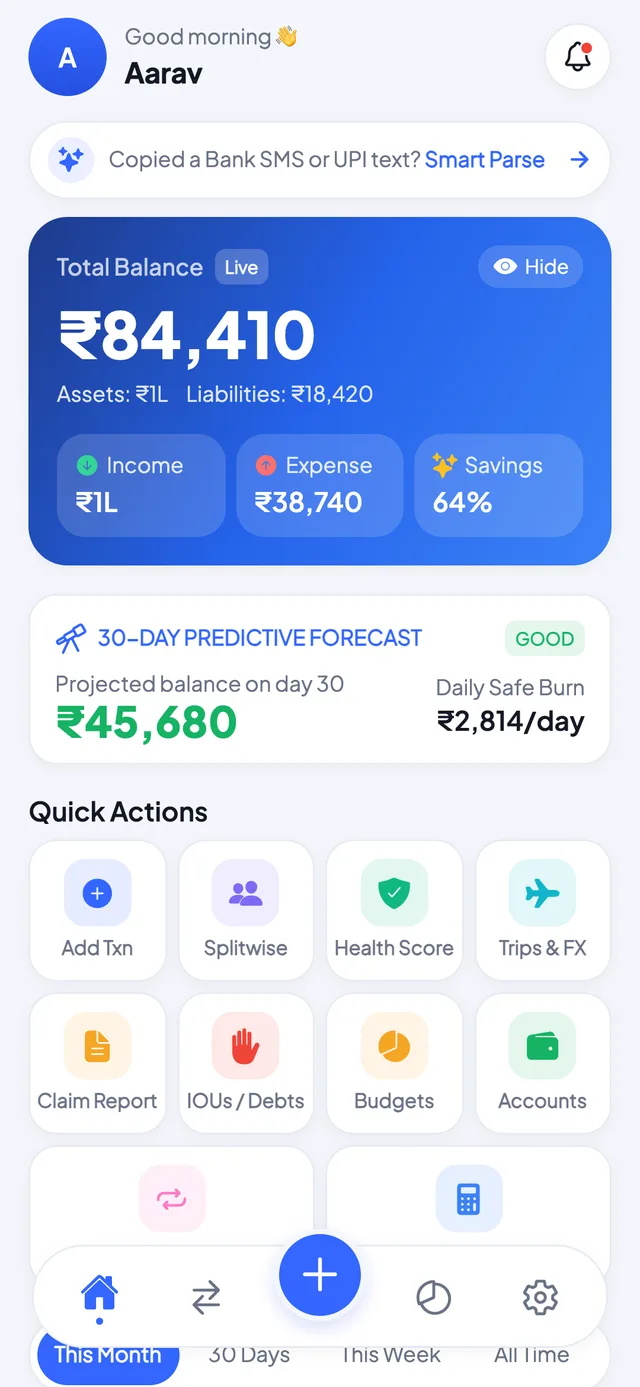
Expense Tracker dashboard showing balance, budgets and the 30-day cash forecast
Definition

What an offline expense tracker actually means

An offline expense tracker stores every transaction on your phone rather than on a company server. It works fully in airplane mode, needs no account and no bank login, and keeps your financial history readable only on the device that recorded it.

That definition rules out most apps that advertise themselves as offline. The distinction that matters is between an app built offline-first and one that merely has an offline mode, and it decides what actually happens when you open it on a plane:

TypeWhere your data livesIn airplane modeAccount requiredExample
Offline-firstOn the deviceEverything worksNoExpense Tracker: Income Manager, Monefy
Offline modeOn a server, cached on the deviceViewing and queued edits onlyYesMost cloud budgeting apps
Online-onlyOn a serverNothing worksYesBank-linking aggregators

Offline-first means there is no server in the loop at all — not a faster cache, but no network round-trip to make.

Everything your wallet needs

One app for all your money

Built offline-first: no account, no sign-up, no cloud sync. Every feature works in airplane mode.

3-Second Expense Entry

Keypad → category → done. Attach receipts, tags & notes when you want the detail.

Daily Budgets & Caps

Category limits, a monthly cap and a daily safe-spend number that keeps you honest. See the 50/30/20 budget calculator.

Splitwise-Style Groups

Trips, flatmates, dinners — split bills, track who owes whom, settle in one tap. Try the bill split calculator.

30-Day Cash Forecast

A predictive view of your balance a month ahead, with a daily safe-burn cap.

Financial Health Score

A live 0–100 score across savings, budgets, debt and emergency runway, including months of emergency fund cover.

Loans, EMIs & IOUs

Payoff meters for every loan, EMI reminders, and lent/borrowed tracking with friends. Check a loan with the EMI calculator.

Travel Mode & FX

Trip budgets plus a multi-currency converter that works even without internet. Read tracking money across currencies while travelling.

Claims & Tax Reports

1-click reimbursement claims and tax-deduction exports as clean PDF/CSV files.

Biometric App Lock

Face ID, fingerprint and PIN lock. Your data is yours — we never even see it. Here is what to check in any finance app.

How it works

How offline tracking works on your phone

Where your data lives. Every transaction, budget and split group is written to a database file inside the app's own private storage on your phone. There is no account to create and no server holding a copy, which is why the app opens straight into your data instead of a login screen, and why it behaves identically in airplane mode as it does on Wi-Fi.

How you back it up. Because nothing syncs automatically, backup is a deliberate step you control. Settings → Backup writes a single JSON file containing your full history, which you can save to Google Drive, iCloud Drive, or your computer. Restoring on a new phone is Settings → Restore and picking that file. The right way to back up an offline finance app walks through a schedule that takes about a minute a month.

What happens if you lose the phone. This is the honest trade-off of offline-first, and it is worth stating plainly: no cloud copy means that if you lose the device and have never exported a backup, the data is gone. Nobody can recover it for you, including us. That is the same property that makes the app private — there is no copy anywhere to leak, sell or subpoena. Export a backup after you set the app up, and you get the privacy without the risk.

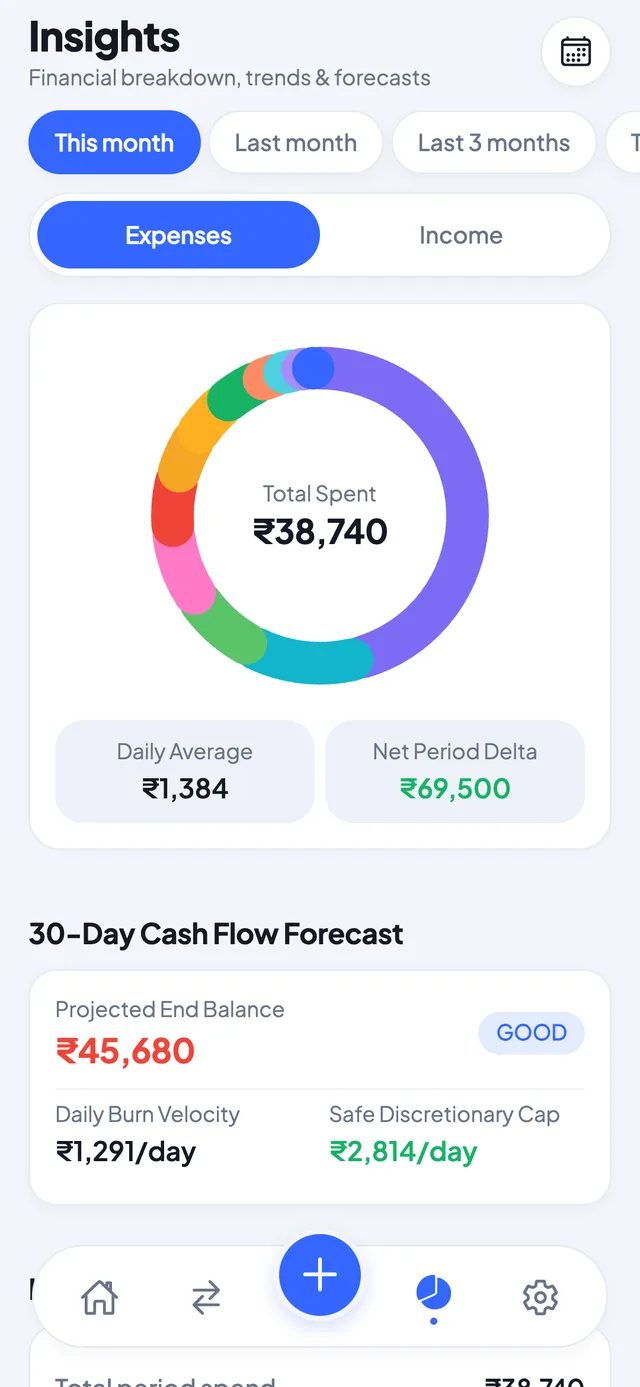
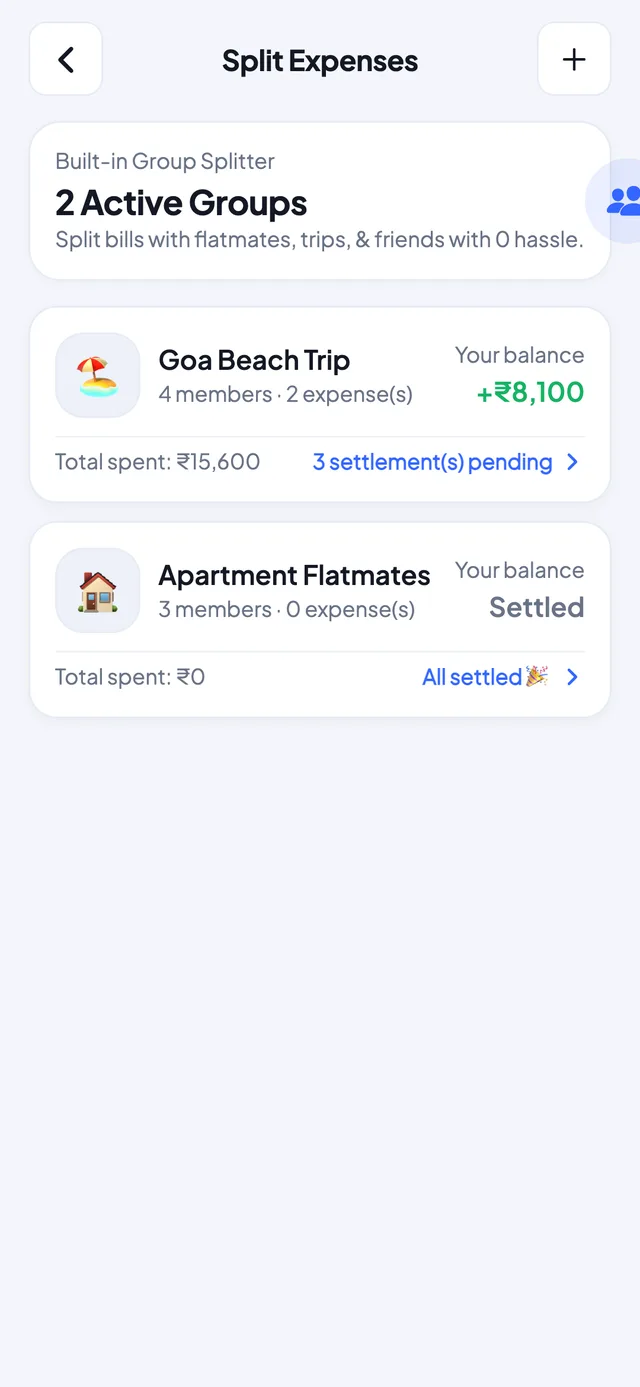
Offline expense tracker dashboard with total balance and 30-day cash forecast Monthly spending breakdown and financial health score meter Splitwise alternative offline group bill splitting interface
The part people assume is impossible

Why an offline app can still capture expenses automatically

The usual objection to offline tracking is that you have to type everything in yourself. That is true of most offline apps, and it is why people drift back to a cloud tracker that reads their bank feed. This app takes a third route: it reads the transaction alerts your bank already sends to your phone, and it does the reading on the phone.

A worked example. Your bank sends Rs 1,240.00 debited from A/c XX4417 to SWIGGY on 04-Sep-26. The parser matches the amount, the merchant string and the account tail, categorises SWIGGY as Food & Dining from its local merchant map, and writes a ₹1,240 expense. By the time you unlock your phone, the transaction is already in your ledger. The SMS itself never leaves the device — parsing runs locally and no message text is transmitted.

About the SMS permission. Read-SMS is a sensitive permission and you should be suspicious of any finance app that asks for it. Here is the check that matters, and you can do it before installing: open the Google Play data safety section and look at what the app says it collects and shares. This app declares no collection of your financial data, because parsing runs on the device and only the extracted amount and merchant are written to your local ledger — never uploaded. Network access is used for store purchases, not for your data. If you would rather not grant SMS at all, every other feature works normally and you enter transactions manually.

UPI alerts parse the same way, which matters in India where most day-to-day spending now runs through UPI rather than cash.

Honest comparison

How it compares to the apps you are probably weighing up

Splitwise owns bill splitting but needs an account and a connection. The offline trackers keep your data local but drop groups, loans and forecasting. This app is the attempt to have both.

AppWorks fully offlineAccount requiredAdsBill splittingLoans & EMIsCash forecast
Expense Tracker: Income ManagerYesNoNoneYesYesYes
SplitwiseNoYesOn free tierYesNoNo
MonefyYesNoOn free tierNoNoNo
Money Manager (Realbyte)YesNoOn free tierNoNoNo
Pocket ClearYesNoNoneNoNoNo

Competitor details checked September 2026 against each app’s public store listing. Apps change; check the current listing before you decide.

Why an offline expense tracker beats cloud apps →

Fair pricing

Free forever. Pro when you're ready.

No ads on any plan. Prices shown in your local currency, billed by Google Play or the App Store.

Free

₹0 forever
  • Unlimited expense & income tracking
  • Budgets, insights & calendar
  • 2 accounts · 1 goal · 1 split group
  • SIP / EMI / FD calculators
  • Local backup & JSON export
BEST VALUE · PAY ONCE

Lifetime Pro

₹699 one-time
  • Everything unlimited, forever
  • 30-day cash-flow forecaster
  • Health score & runway audit
  • SMS / UPI auto-parser
  • Claims, reports & biometric lock

Annual Pro

₹299 / year
  • 14-day free trial
  • All Pro features included
  • Just ₹25 / month
  • Cancel anytime
  • Also: ₹29 / month plan

Purchases are processed securely by Google Play / the App Store. We never see your payment details.

Free Tools

215 Free Financial Calculators

Plan before you track — EMI, SIP, FD, PPF, retirement, budgets and more. The same formulas banks use, free and instant.

See all 215 calculators →

Straight answers

Frequently asked questions

Does the expense tracker work without internet?

Yes. Every feature works in airplane mode — expense entry, budgets, group bill splits, the 30-day forecast and reports. The app has no server to talk to, so there is nothing to wait for and nothing to fail when you are offline.

What is the best offline expense tracking app?

It depends on what you need beyond logging spend, and this is our own app’s page, so weigh it accordingly. For solo manual tracking with a clean interface, Monefy and Money Manager are the long-standing choices. For splitting bills with friends, Splitwise is the standard, though it needs an account and a connection. Expense Tracker: Income Manager is built for the overlap the others leave out — offline tracking plus group splits, loans and EMIs, and a 30-day forecast in one app with no account. Judge any of them on three things: whether it truly works in airplane mode, whether you can export a backup you control, and what its store data-safety declaration actually says.

What happens to my data if I lose my phone?

Because there is no account and no cloud copy, a lost phone means lost data unless you have exported a backup. Use Settings → Backup to write a JSON file and save it to Google Drive, iCloud Drive or your computer. Restoring on a new phone is Settings → Restore, then choosing that file.

Is there a free version?

Yes, free forever, with no ads on any tier. The free plan covers unlimited expense and income tracking, budgets, insights, the calendar, local backup and JSON export. Pro unlocks the 30-day forecaster, the health score, SMS and UPI auto-parsing, claims and reports.

Which platforms is it available on?

Android through Google Play, and iOS — iPhone and iPad — through the App Store. The same offline-first design applies on both.

How is this different from Splitwise?

Splitwise is built around an account and a server, so splitting needs a connection and your group data sits with the provider. This app splits bills on the device with no account at all, and tracks your personal budgets, loans and EMIs in the same place — which Splitwise does not do. How to avoid money fights in friend groups covers the etiquette side.

Does the SMS parser send my messages anywhere?

No. Parsing happens entirely on the device. The app reads the bank alert, extracts the amount and merchant, and writes a transaction locally. The message text is never uploaded. Network access exists only for Play Store purchases, and the Google Play data safety section is the place to verify what is and is not collected.


Who builds this

Built by one developer who got tired of bank-linking apps

Gurjeet Singh, Sharpen Solutions. I built this after going through the permission screens of the popular expense trackers and finding that most wanted my bank credentials, an account on their server, or both — to solve a problem that is really just arithmetic on my own phone. Offline-first was not a marketing angle to me. It was the shortest path to an app I was willing to put my own salary into.

The same reasoning produced the rest of this site: 215 financial calculators and a library of money guides, all free, none of which ask you to sign in. If a tool can run without collecting anything, it should.

Feature requests reach me directly at support@expenseincomemanager.com — there is no support team in between.

We reply fast

Contact & feature requests

Found a bug, want a feature, or just have a question about the app? Drop us a line — real humans read every message.

Support & feature requests

support@expenseincomemanager.com

App deep link

expensetracker:// — opens the app directly from links.

Privacy promise

Your financial data never touches a server — there is nothing for us to leak, sell or lose. Read the policy.

Opens your email app with everything pre-filled — sent from your address to support@expenseincomemanager.com.